Revenue
Sales drops against your own weekday baseline, products that stop selling and unusual silences with no orders.
- Sales drop (1, 3 and 7 days)
- Product sales drop
- No orders anomaly
Every change sends a signal. Store Watch watches sales, stock, returns, fulfilment and your catalogue, and tells you which signals need your attention — with their impact in money.
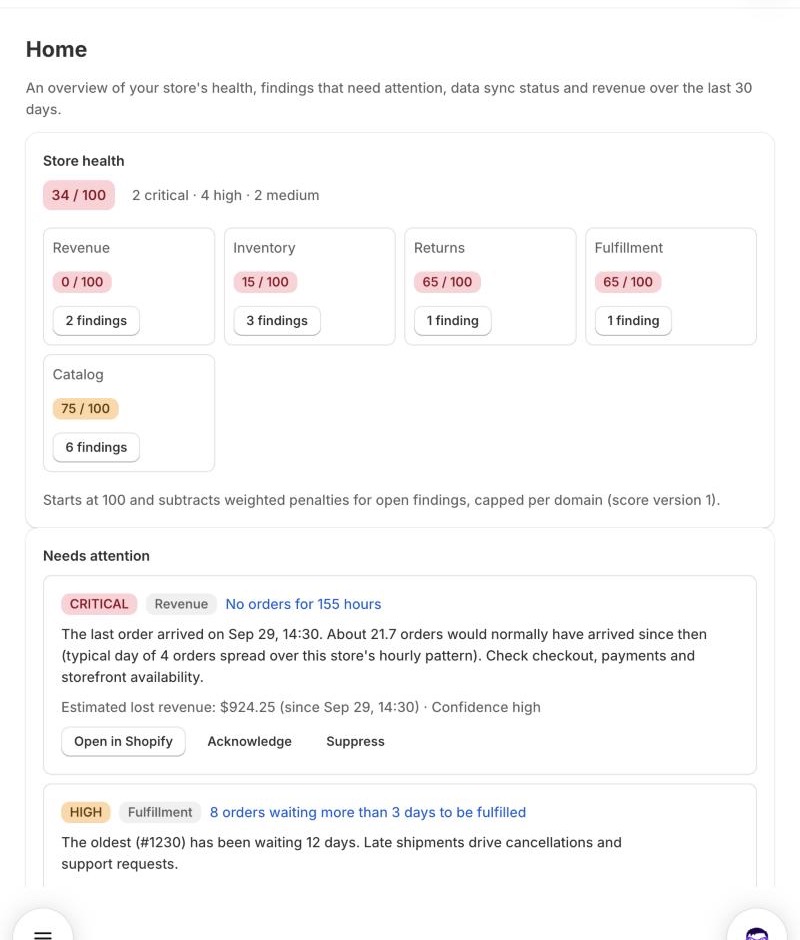
Your store produces thousands of numbers a day. The problems hide between them: a best seller that quietly runs out, an afternoon with no orders, a product that suddenly gets returned, orders that sit unshipped.
Store Watch learns what is normal for your store, flags the exceptions, estimates what each one costs and ranks them, so you know exactly where to look first.
Each finding explains what was observed, what was expected, the estimated impact and how confident Store Watch is.
Sales drops against your own weekday baseline, products that stop selling and unusual silences with no orders.
Days of cover per variant from real sales velocity — counted only on days the item was in stock.
Refund rates that jump above their normal level, with the variants that drive them.
Orders waiting too long to ship and a backlog that grows faster than usual.
Consistency checks on active products, so listings are complete before customers notice.
One score that starts at 100 and subtracts weighted penalties for open findings, capped per domain. Versioned, so it stays comparable over time.
The hard part of monitoring is not finding problems — it is staying quiet when there are none. Store Watch is built around the quality of its signal.
Next step: review the product and plan a reorder in Shopify.
No setup, no spreadsheets. Store Watch starts working the moment you install it.
One click, read-only permissions for products, inventory, orders and locations. Nothing in your store changes.
Your catalogue, stock and order history are imported in the background. Catalogue and fulfilment checks give results right away.
Store Watch keeps in sync with Shopify webhooks, recalculates metrics every hour and evaluates every rule against your baseline.
Findings ranked by impact in the app, a daily or weekly report by email, instant critical alerts and Slack summaries.
Store Watch lives inside Shopify with familiar Polaris design. Nothing new to learn.
An immutable snapshot of your store — score, what changed, new and resolved findings — every day on paid plans, every week on Free.
An email the moment a critical finding opens, once per episode. Set quiet hours and emails wait until they end.
Add to Slack in one click and get each report summary in the channel your team already watches.
Download your findings for spreadsheets, audits or your weekly ops meeting.
Billed by Shopify on your Shopify invoice. Change or cancel your plan any time from the app.
For new stores getting started.
No billing required
For growing stores that check daily.
or $99 billed yearly
For teams that need to know immediately.
or $249 billed yearly
Prices in USD. Limits are soft: Store Watch keeps analysing your whole store, shows your usage and lets you know when it is time to upgrade.
| Feature | Free | Starter | Growth |
|---|---|---|---|
| Findings shown | Top 5 | Unlimited | Unlimited |
| Reports | Weekly | Daily | Daily |
| History | 60 days | 90 days | 12 months |
| Configurable thresholds | — | ✓ | ✓ |
| Instant critical alerts | — | — | ✓ |
| Slack | — | — | ✓ |
| CSV export | — | — | ✓ |
| Email recipients | 1 | 1 | 3 |
| Store health score | ✓ | ✓ | ✓ |
Store Watch only reads data to detect problems. It cannot change your products, inventory, orders, prices or theme — the permissions to do so are never requested.
No. Store Watch requests read-only permissions only. It never edits products, prices, inventory, orders or your theme.
Catalogue checks and aged unfulfilled orders appear right after the initial import. Sales and stock rules become more precise as Store Watch learns your store's normal patterns from your order history.
Yes. Detection uses statistical tests designed for low order volumes, so small stores get meaningful findings instead of noise. Sales silence alerts switch on only when a store has enough orders per day for them to be reliable.
Nothing breaks. Limits are soft: Store Watch keeps analysing everything, shows your usage against the limit and suggests an upgrade.
Through Shopify. Plans appear on your regular Shopify invoice and you choose, change or cancel them on Shopify's own plan page.
No. Order webhooks are trimmed so customer details never reach Store Watch, and none are kept from imports.
The app is in English. Amounts use your store currency and days follow your store's time zone.
Install Store Watch for free and see your first findings today.
Install free on Shopify